
Plan your content
Exercise
foundational
+60XP
30m
Unity Technologies

In this exercise, you will briefly get acquainted with week two of Unity’s Professional Development for Instructors. Then, you will begin planning the content for your Unity course, including uploading content to your Learning Management System (LMS) or other preferred platform, and then editing it to fit your course. At the end of the exercise, you will take a screenshot of the content in your student-facing platform and share it on Unity Learn and with others on Discord.
Languages available:
1. Week Two goals and outcomes
Welcome to week two of Unity’s Professional Development for Instructors! This week, you will begin developing your Unity course. This includes building content in your preferred student-facing platform or LMS, starting from a template we provide. We’ll also cover other planning topics such as which Unity licenses to choose for your classroom or lab computers, and how to set up version control for easy project tracking and assessment.
In this first tutorial of week two, we provide you with resources that make it easy to upload the content to your preferred student-facing platform or LMS as a starting point for designing your Unity course. The content is aligned to Unity’s Game Developer certification.
2. Unity Game Developer certification
At Unity, we have a suite of certifications that are aligned to the realtime industry. Many of our certifications are on state Career and Technical Education (CTE) lists at the high school level, meaning schools may receive funding support for offering the certification. And across high school and postsecondary institutions, embedded industry certifications have been shown to increase student interest in programs of study and competitiveness in the job market upon graduation.
In this professional development, we focus on the Associate Game Developer certification. The resources we provide you align to this certification. Take a moment now to browse the exam objectives for this certification.
3. Discord Discussion: Content first impressions
Now let’s take a look at the learning content that is aligned to this Game Developer certification. This content is appropriate for anyone who is just getting started or has a baseline of experience with Unity.
Take a moment to download and review the Scope and Sequence for this content, keeping in mind that it is just a starting point. Once loaded into your LMS, you will be able to divide up the content, reorder it, and add to it however you want! We will discuss some of your options for modification shortly.
For now, head over to Discord and answer the following prompts:
- What aspects of the content look most promising?
- What questions or concerns do you have at this stage?
- Do you have experience teaching to certification? To what extent?
4. Content format
When you upload it, the content we provide you will show up in your student-facing platform or LMS in 10 units that cover all learning objectives for the Game Developer certification. For each unit in the course, we have provided the following four types of resource:
Slide decks
Slide decks explain the key concepts and learning objectives for the unit-at-hand. As an instructor, these can be used for lectures or lesson kick-offs. Learners will also be able to access these decks as review materials through the LMS.
Tutorials
The step-by-step tutorials are designed to be self-paced for your students, or you can choose to demo parts of them in class. Consider these tutorials as similar to a textbook, guiding students through the content.
All tutorials include Unity project files and assets for your students. In an ideal world, you would be able to work through these tutorials before your learners would so that you gain familiarity and comfort with the content you will deliver in your courses.
Assignments
Assignments are activities that prompt students to submit assignments directly to your LMS.
Quizzes
Unit quizzes allow you to assess and track learning directly in your LMS.
5. Import your course to an LMS
If you use a typical LMS, like Blackboard, Canvas, or Moodle, you’ll be able to import a common cartridge file and instantly have your course ready to go. If you are not using an LMS, or you are using an LMS like Google Classroom that does not accept common cartridge files, skip to the next step.
Take a moment now to import the content and do an initial review. To import your course, follow these instructions:
1. Download the course common cartridge file.
2. Follow these upload instructions for common LMSs.
After completing these instructions, you should see something similar to the screenshot below, where the entire course appears in your LMS, broken up into 10 units.
6. Plan your course with Google Classroom or other platform
If the student-facing platform you use does not support importing common cartridges — like Google Classroom — your options are outlined below.
Google Classroom
If you’d like to set up this course in Google Classroom, you may need to build the course Classwork manually. You can use this list of links to the course materials to build the materials, assignments, and quizzes in a new course. By the end, your course would look similar to the screenshot below, where each activity is simply a link to a tutorial or challenge on the Learn platform. If you want students to submit their work and complete quizzes inside Google Classroom, you would have to set up those submissions and Google Form quizzes manually.
Other platforms
If you are using another platform not accounted for above, or you do not have an official student-facing platform or LMS, you can simply direct students to this version of the Associate Game Dev prep course on Unity Learn. There is a screenshot of this course below. Students can go through this content at their own pace, then submit or share their work with you periodically for feedback and evaluation.
7. Shape your course
At this stage, you are likely asking practical questions such as, “How do I adjust this course to meet my unique needs?”, “How will my course flow?”, and “What will my day-to-day look like?”. We have sourced answers to these questions and more from experienced Unity educators.
As a next step, open the course in your LMS and make your first round of edits. Here are a couple points to keep in mind:
- The content is linear: If you don’t have time to cover the full 10 units, you can start from the beginning of the course and simply cut the units you won’t get to with your students. Just remember, if you cut a lot it may be harder for your students to pass the Game Developer certification, if that is your goal.
- There are endless variations – do what works best for your course: Do you teach a semester-long college course? A year-long high school CTE course? An online continuing education course? You can edit this content to meet your needs.
Optional
Peruse these Unity course structure case studies to see some of the variation possible when teaching Unity.
8. Submission: Share a screenshot of your course
Below, share a screenshot of the platform you’ll be using with your content uploaded. Share the screenshot on Discord as well, along with answers to one or more of the following questions for insight and inspiration:
- Which of the resources provided in the content template will you use? Will you remove any?
- How have you modified the content to meet your unique course structure and needs?
Please login to submit
Complete this Tutorial
Submission Gallery

Unity Developer Course
The Course is created in Canvas LMS
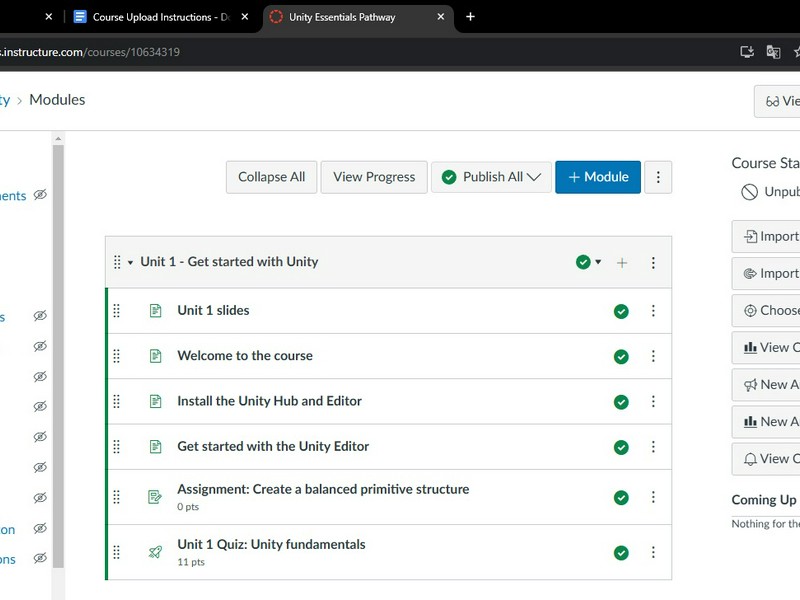
Unity Essentials Pathway - Ledesma
Just a screenshot of the course
kids room
small part of my project
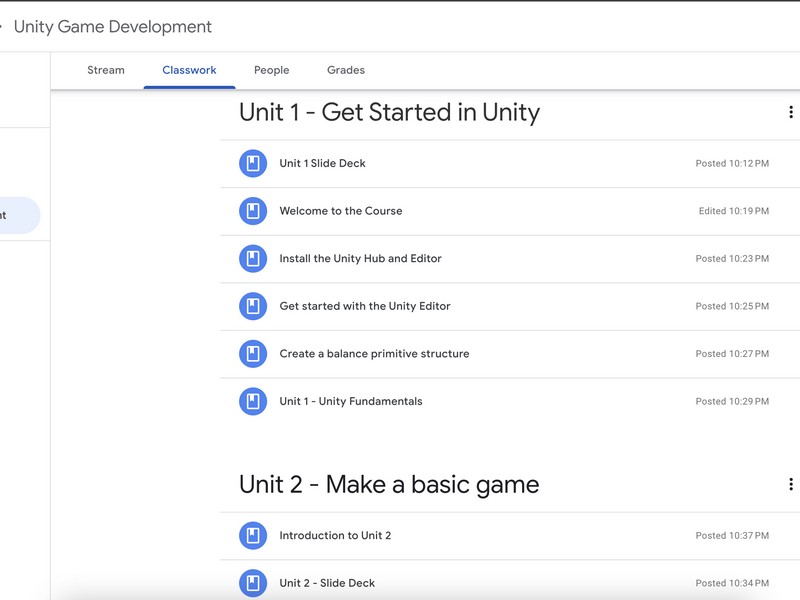
Course Outline
Course outline created with Google Classroom
Unity course in Canvas
This is my content imported into my Canvas course

My Canvas Unity Course
Here is a screenshot of the units in my Canvas course. I will probably end up importing this into one of my existing courses and trim some of the content as I work through it with my students.