
Share your course plan
Exercise
Beginner
+60XP
1h
Unity Technologies

In this tutorial, you will review your progress-to-date and put finishing touches on your Unity course. At the end of the tutorial, you will submit a video walkthrough of your course plans to both Unity Learn and on Discord.
Languages available:
1. Review your progress-to-date
Let’s take a moment to review your progress so far. In the first three weeks of this professional development, you have done the following:
- Learned foundational Unity skills, including navigating 3D space and manipulating 3D objects.
- Prepared to teach your Unity course, including possibly uploading the curriculum to your LMS, deciding on your Unity license strategy, and preparing your version control solution.
- Prepared your strategies for teaching Unity effectively, such as co-learning, managing differentiated pacing, troubleshooting, and assessment.
That’s an enormous amount of effort and learning in just three weeks. Take a moment to celebrate and reflect on your take-aways, and any outstanding questions you may have.
2. Continue designing your course
After reflecting on your own learnings, as well as the Unity advice and educator recommendations you’ve received over the past three weeks, take some time now to continue – or finish – designing your course.
Take a look at your student-facing course
- Does any content need to be cut, added, or reordered?
- Do any due dates or benchmarks need to be set?
Configure your GitHub or Unity Version Control account
If you decided to set up a version control system, check the following:
- Is your repo set up?
- Have you downloaded the desktop client?
- Are your starter folders edited to meet your needs?
Consider your pedagogical strategy
- Do you know when and how you will present new information to the class, and when they will work independently or in groups?
- Is your troubleshooting checklist ready?
Review your plans for assessment
- Which assessment tools will you use, and when?
- Do you need to make any edits to the assessment templates we’ve provided?
You may not complete your course preparation in this moment, but do what you can and make note of what you still need to accomplish.
3. Next steps
After these three weeks, regardless which course or content you’re planning on bringing to your students, we would recommend that you begin going through that content yourself. You can go through the course on Unity Learn or on your own student-facing platform. Basically, the goal is for you you to going through the same content that your learners would be expected to go through.
Also, if you plan on teaching content that would prepare your learners for certification, you may want to get certified yourself! Not only will this prepare you for teaching the content, but it is great to have on your résumé and for professional development in general.
Plus, you’ll continue to have access to the community on Discord as you go through this content.
4. Get ready for the Course Wrap-up event
As a culmination of your three-week professional development journey, you will have the opportunity to join the second and final live events to wrap-up the course, highlight some achievements, and answer any outstanding questions you have.
Check the calendar on your Professional Development course page for the date and time of this upcoming event!
5. Complete the post-course survey
We are always trying to improve our content and make sure we are preparing educators for success. We would love to get your feedback so we can continue improving.
Please take a few moments to complete the post-course survey now.
6. Submission: Submit a screen capture detailing your plans
Make a one-two minute video of your current course plan, to share both below (in the Unity Learn gallery) and with others on Discord.
In the video, be sure to address most or all of the following points:
The structure and flow of your course at a high level
- What is the course and who are your students? Game Development 101 for college freshmen? A technology survey course for high school juniors and seniors?
- How long is your class and what is the format? Is it a one semester hybrid course? A year-long in-person course? A three month online course?
- At a high level, what will the start, middle, and end of the course look like?
Any pedagogical decisions you’ve made and why
- How will you configure your projects and what will those projects be, at a high level?
- How do you plan to track and assess student work? Will you use version control? What rubrics or other grading tools and philosophies will you employ?
What is outstanding?
- What out-standing questions or concerns do you have that your fellow classmates on Discord might be able to help with?
- What do you have left to do in order to get your Unity course and curriculum ready for students?
Please login to submit
Complete this Tutorial
Submission Gallery

2D Adventure Game Lesson Plan plus Animation
Using the 2D Adventure Game lesson on Unity Learn, students will work at their own pace with the help of the mentor as a guide. They will create their own 2D game along with custom Animations and characters near the end of the course. Cannot upload the video so here is the link to google drive: https://drive.google.com/file/d/1eSqWvf8L8iYrM13i2ImHIPk9f_mCy3y2/view?usp=sharing

3 week module on Unity
Short 3 week module in the Intro to Gaming Ecosystem class
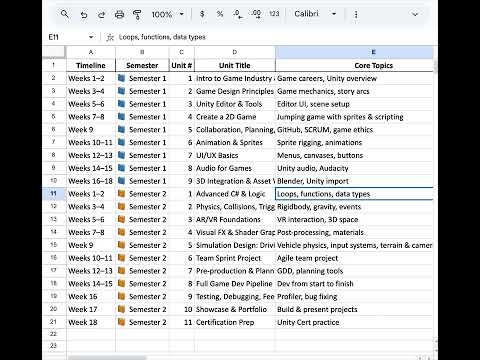
Stanczyk Year 1 Video Game Design Development Program Plan
This is a quick description of the plan for the Video Game Design Development Program at our school

Our Course Plan
Title: Unity Basics – NRIDL × Unity Game Development Bootcamp Audience: High-school juniors & seniors and first-year college beginners (mixed backgrounds ok). Length & format: 40 hours. Default delivery: 8 weeks × 5 hrs/week (hybrid) — weekly in-person studio + Discord for check-ins. Alternate intensive: 5 days × 8 hrs/day. High-level flow (sessions): • Session 1: Setup (Hub + Editor), tour of UI, first C# script, asset import & project hygiene. • Session 2: Core mechanics with physics + C#, simple game states, intro to team workflow & version control basics. • Session 3: UI, audio, polish, debugging, peer playtesting and iteration. • Session 4: Build & publish (WebGL / desktop), portfolio storytelling, intro to monetization paths. • Session 5: Demo Day showcase, portfolio reviews, next-steps (internships, self-publishing).

Learn Unity - 3D Gallery Project
I plan to introduce Unity in my experimental media arts class at the end of this semester. I've created a folder for the course material in the 3rd Module of the course.
Game Development Bootcamp
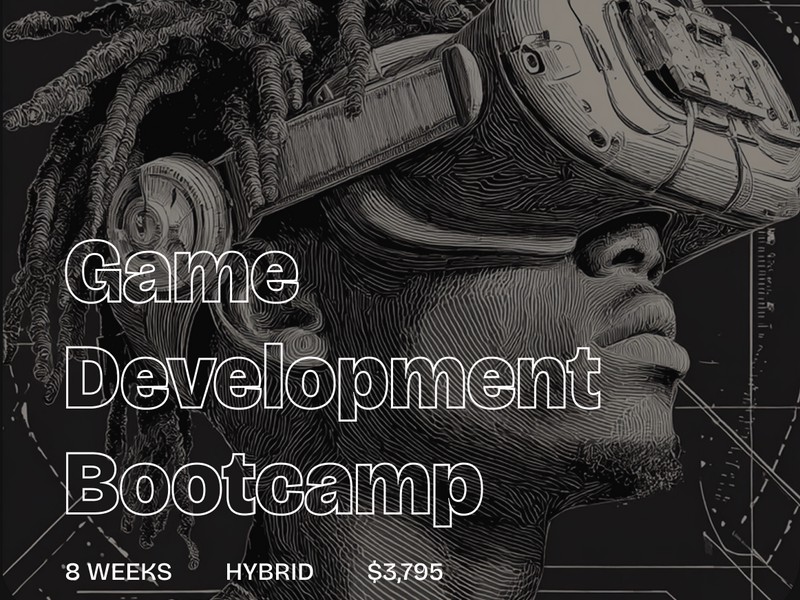
The Game Development Bootcamp for high school students is an intensive, curated program designed to empower and prepare students to embrace interactive emerging technologies. It aims to inspire them to start preparing early for high-growth, high-paying careers in technology. The bootcamp offers students a chance to shape their career paths, stand out in college and job applications, or even gain the confidence to start their own game studios — all in response to the demands of today’s highly competitive world.