
Submission: Bring art to life with AR
Exercise
Beginner
+60XP
1h 30m
Unity Technologies
In this challenge, you'll follow a project brief to create an interactive AR marker application that makes art come to life.
Languages available:
1. Overview
In this challenge, you will follow a project brief to create an interactive AR marker application that makes art come to life.
2. Project brief: Bring art to life with AR
A whole new art form is using AR to bring an art piece to life. An artist is looking for new ways to share their art with the world and has asked for an AR app that will take their finished art pieces and make it deeper by adding audio, animations, and information to an existing piece. The artist has asked you to create an application using an art piece that you like as an initial test of your capabilities.
Inspiration to consider
The artist was inspired by the experiences found in the following videos:
Features
The artist is looking forward to seeing what you can come up with, but before they give you their own art to work with they would like to see what you can do with an art piece you already have access to. Using the asset store or online 3D model resources and 2D applications is acceptable as long as you follow all copyright guidelines in your proof of concept.
The experience should begin by searching for an AR marker target. Once the app finds the target, the art and any modifications you have made should appear. The app should also include a button to turn on and off information about the art and the artist using a button on the screen. The artist has requested that the app includes:
- A digital representation of the art
- Audio that matches the mood of the art piece
- Lighting that matches the colors and lighting of the piece
- Colors for text objects that match the colors of the art piece
The artist wants to see what you can come up with using your own creativity, but has said that they would like to see at least one of the following:
- Animations
- 3D objects
- Spatial sound
Example
Below is an example of the type of project you might make to fulfill these requirements, though yours could be completely different.
In this first example, an image from a painted canvas comes to life when scanned. The 2D mountains stand up off the canvas, a set of particle systems brings the fog to life, and the implied water in the art below the boat is replaced with water that moves. The audio in the piece is turned on and off using a button. The lighting in the piece matches the colors of the original painted piece. The original artist is given credit using a world space canvas.
In this second example, an image from a printed picture comes to life when scanned in a slightly different way than the previous example. The 2D image is recreated and stands behind a scene that brings the foreground to life. Particle systems for clouds stand off the page, and they are color matched to the types of colors in the art. The lighting color and orientation is also adjusted to match the lighting in the art. There are a variety of models including a tree, various animals with animations, water, a terrain, rocks, and detailed grasses. There is even a wind system that moves the grass around. The audio in the piece is toggled on and off using a button. The original artist is given credit using a world space canvas.
3. Requirements
To successfully complete this challenge, you must meet the following requirements:
- The marker must spawn an AR experience that includes the original art piece in some form but must use 3D space to bring that art to life.
- The UI must include a button to turn on and off audio that matches the mood of the original art piece.
- The UI must include text information about the artist and piece of art.
4. Additional submission guidance
Here are some key things to consider as you work on your submission:
Assets
You’re free to reuse and modify any assets you used in this course in any way you like. You can also add extra assets of your own design or from resource sites such as the Unity Asset Store or Sketchfab.
Important: Make sure that you use any third-party assets in accordance with the license provided by the asset creator.
User interface
How will your users control the audio or display content? Design any UI elements that you wish to use and implement them in Unity. You can use the UI button prefab from the this project as a starting point or design your own.
If you need further resources on how to create user interfaces in Unity, Creative Core: UI is a great place to start.
Visual scripts
Create the graphs that you need to make your app work. Remember to make separate graphs for each major part of the functionality to keep things organized and easy to understand. You can reuse and modify all of the graphs that you created in the previous project or design your own.
If you need further resources on working with Visual Scripting, try our Introduction to Visual Scripting.
5. Submit your work
After you’ve fulfilled the requirements, please submit and share your project! Before you do though, make sure you’ve thoroughly tested it — or even better, ask a friend or family member to test it too.
Follow these instructions to submit your project:
1. Take a screenshot of your project or take a screen-recording of your AR friend.
2. Add a submission title and description. Make sure to include the video recording. If you have additional details to share about your process or the project that you have created, you can share them in the description too.
3. Set who can view your submission:
- Public: Anyone who views this tutorial.
- Private: Just you.
4. Select Save and preview submission.
5. Check your submission preview and then complete the CAPTCHA test and select Submit and continue.
We highly recommend that you comment on at least one other creator's submission. Did they successfully complete the challenge? What do you like about the project? What would be a cool new feature they might consider adding?
Please login to submit
Complete this Tutorial
Submission Gallery
Plant Growth Chart
My marker‑based AR app uses the seed packet as a visual marker to display interactive plant growth information. When the user points their phone camera at a package of vegetable seeds, the app recognizes the printed marker and overlays a digital growth chart on top of it. The chart shows each stage of the plant’s development, including germination, sprouting, leaf formation, and full maturity. Users can move around the packet to view the AR content from different angles, and the information stays anchored to the physical object. The goal of the app is to make seed packets more informative by giving gardeners an easy way to visualize how their plants will grow over time.
IKEA Place AR – Part 1: Placing an AR Object
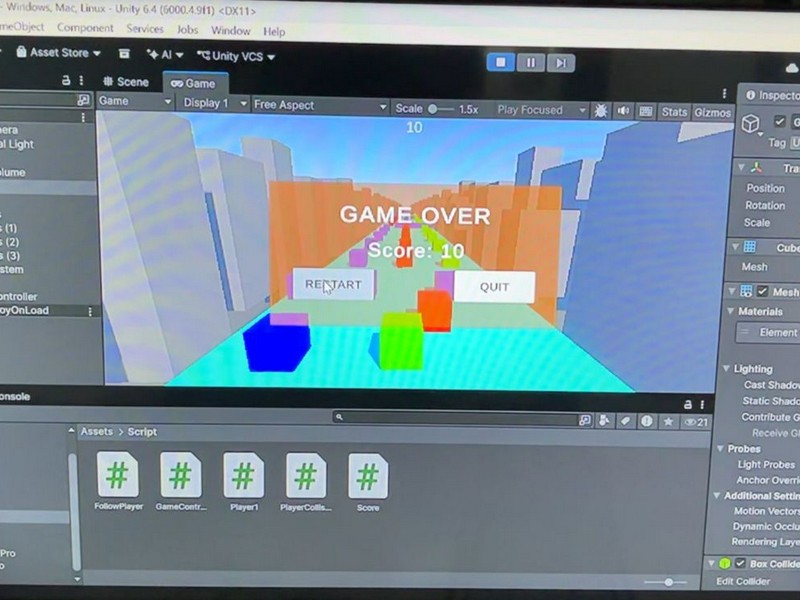
This project is a mobile Augmented Reality application developed using Unity and AR Foundation. It detects horizontal planes in the real world and allows users to place a 3D furniture object by tapping on the detected surface, similar to the IKEA Place app. The project demonstrates plane detection, AR object placement, and basic user interaction in AR.

art work
art coming to life
bring art life with AR
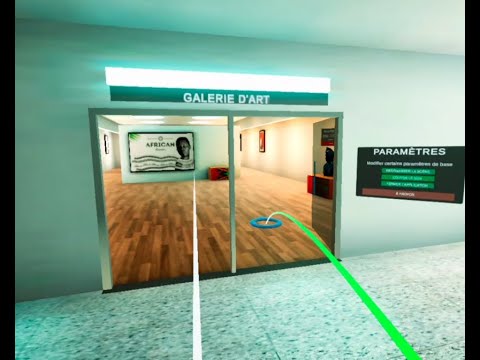
this is a demo of a VR art gallery i am working on for a client the sculptures are made with blender (From real life Typical wood African Art)

re:
Right now there are some really great opportunities for growing online, even if you don’t own a huge blog or your own business with a website. Even a small blog can bring in facebook monetization if you have an engaged audience and high traffic. And it’s definitely not always about the number of followers. There are different ways to monetize, but placing ads is definitely something worth thinking about.

erafgzfvf
dxx