
Week 5 | Session 1 - Move and Orbit the Player - April 20, 2020
Tutorial
Beginner
+10XP
60 mins
(38)
Unity Technologies
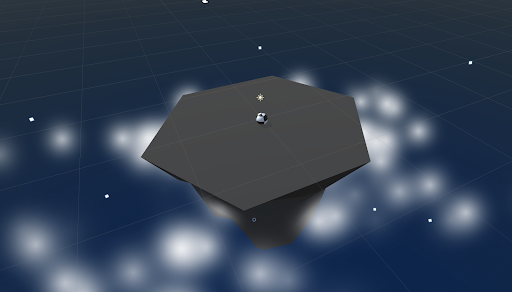
First thing’s first, we will create a new prototype and download the starter files! You’ll notice a beautiful island, sky, and particle effect... all of which can be customized! Next you will allow the player to rotate the camera around the island in a perfect radius, providing a glorious view of the scene. The player will be represented by a sphere, wrapped in a detailed texture of your choice. Finally you will add force to the player, allowing them to move forwards or backwards in the direction of the camera.
Resources
Languages available:
1. Overview
This is the same content covered in Lesson 4.1 in the independent Create with Code Course.
What you will make:
- The camera will evenly rotate around a focal point in the center of the island, provided a horizontal input from the player. The player will control a textured sphere, and move them forwards or backwards in the direction of the camera’s focal point.
What you will learn:
- Apply Texture wraps to objects
- Attach a camera to its focal point using parent-child relationships
- Transform objects based on local XYZ values
2. Before you Begin
To participate in this session and follow along, you need:
- Unity 2018.4 installed
If this is your first Create with Code live learning session, you can catch up by:
- Following along with the recordings of our previous live learning sessions
- Completing the same lessons in the independent Create with Code Course
*Note - it is not necessary for you to catch up, but it is recommended for an ideal learning experience.
3. Recorded Live Session - 20th April - 9am PST
If you missed this session, you can catch up with the video below.
4. Recorded Live Session - 20th April - 5pm PST
If you missed this session, you can catch up with the video below.
5. Next Steps
Get caught up:
If you were not able to finish the session along with the instructors, you can catch up by:
- Re-watching this recorded session when it is posted in Step 3 above at 3am PT (10am UCT) the morning after this session's date
- Picking up where you left off in Lesson 4.1 of the independent Create with Code Course
Bonus Challenges:
- Experiment with new features (after making a backup)
- Change the orbiting and forward/backward force to be controlled by mouse movement
(bonus: create a keyboard shortcut to switch between mouse vs keyboard control) - Create a “hop” button to allow the ball to hop up and down
- Change the orbiting and forward/backward force to be controlled by mouse movement
- Look ahead to the next lesson
- If you want to go ahead and preview what we'll be covering in the next session, you can give it a try in Lesson 4.2 of the independent Create with Code Course.